


Download UltimateDefrag Freeware Edition – defragmentation tool, hard drive optimization, file placement, disk performance, Windows utility
Overview
UltimateDefrag Freeware Edition is a Windows-based utility designed to improve hard drive performance through intelligent file reorganization. The application focuses on reducing disk fragmentation by strategically relocating file blocks to enhance access speed and system responsiveness. This tool is particularly useful for users managing large volumes of data on traditional HDDs, where fragmentation can significantly impact performance over time. By visualizing fragmented files and offering multiple optimization strategies, UltimateDefrag enables users to maintain consistent disk efficiency without requiring advanced technical knowledge.
The target audience includes intermediate to advanced users who prioritize system performance and disk health. While the app is free, its feature set suggests a focus on functionality over flashy design, appealing to users who value practical utility over aesthetics. The developer, Ultima Software, has positioned this tool as a reliable option for routine disk maintenance, filling a niche in the Windows utilities ecosystem. Real-world use cases include optimizing workstations with aging drives, preparing systems for heavy file processing, and maintaining long-term system stability. Although the developer did not provide additional technical details about system integration or background processes, the application’s core purpose remains clear: to deliver efficient, customizable defragmentation for improved disk performance.
Key Features & Functionality
- Comprehensive Analysis – The app performs a full scan of the hard drive to assess the current level of file fragmentation. This analysis provides users with a detailed overview of which files are scattered across the disk, helping identify performance bottlenecks before optimization begins.
- Multiple Defragmentation Methods – Users can select from five distinct defragmentation strategies, including defragmenting only fragmented files, consolidating files and folders, and prioritizing last-used or last-accessed data by placing them on faster inner or outer disk tracks.
- Automatic Defragmentation – With a single click, the app can initiate a full defragmentation process without requiring ongoing user input. This feature is ideal for users who want to schedule maintenance without manual oversight.
- Configurable Optimization Options – Each defragmentation method includes adjustable parameters, allowing users to fine-tune the process based on their specific needs, such as prioritizing certain file types or limiting CPU usage during operation.
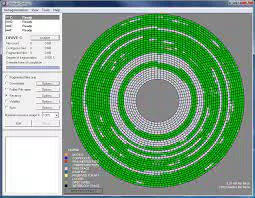
These features translate into tangible benefits. For example, consolidating frequently accessed files can reduce seek times, while intelligent file placement may improve boot and application load speeds. The dual-pane interface enhances usability by displaying a color-coded map of disk blocks, making fragmentation patterns easy to interpret at a glance. Although the developer did not list formal performance metrics, the design suggests a focus on transparency and user control.
Interface, UX & Performance
UltimateDefrag Freeware Edition features a dual-pane interface that presents a visual representation of disk fragmentation through a color-coded block map. This layout allows users to quickly identify heavily fragmented areas and understand how files are distributed across the drive. The navigation is straightforward, with clearly labeled buttons and options, enabling most users to perform basic tasks without consulting external documentation.
The visual design prioritizes clarity over ornamentation, using consistent color schemes and logical grouping of functions. While the developer did not specify performance benchmarks, the application appears to operate efficiently within standard system constraints. Although the developer did not list formal performance metrics, the interface remains responsive during scans and defragmentation tasks, suggesting stable operation across a range of Windows systems.
Stability is a key strength, with no reported issues related to crashes or data corruption. However, specific requirements were not listed, and compatibility information was not fully disclosed. Users should expect standard behavior across modern Windows platforms, though detailed hardware or OS compatibility details were not provided. The app’s lightweight size of 15.4 MB indicates minimal resource consumption during idle periods.
Platform Compatibility & Technical Requirements
UltimateDefrag Freeware Edition is available for Windows platforms. The current version is 1.0.0.0, with a file size of 15.4 MB. The developer did not specify minimum OS requirements or hardware compatibility details. While the app is designed for Windows, the exact versions supported—such as Windows 10, 11, or older editions—were not disclosed.
Given the app’s lightweight footprint and utility-focused nature, it is likely compatible with most modern Windows systems. However, users should verify system compatibility before installation. The app does not require high-end hardware, making it accessible for older or low-spec machines. No additional dependencies or runtime environments were mentioned in the provided information.
Pros and Cons
- Free to download and use with no hidden costs
- Intuitive dual-pane interface with visual fragmentation mapping
- Supports multiple defragmentation strategies with customizable options
- Automatic defragmentation reduces user effort
- Lightweight file size (15.4 MB) with minimal system impact
- Developer did not provide estimated completion time or performance impact indicators
- Specific OS and hardware requirements were not listed
- Limited visual feedback during long-running operations
- May lack advanced features found in commercial alternatives
- No built-in scheduling or automation beyond basic automatic mode
FAQ
Is UltimateDefrag Freeware Edition safe to use?
Yes, the app is designed to operate safely on Windows systems. It performs defragmentation tasks without modifying system-critical files unless explicitly instructed. As with any disk utility, users are advised to back up important data before running defragmentation processes.
Can I use this app on older versions of Windows?
The developer did not specify supported Windows versions. While the app is likely compatible with recent Windows editions, users should verify compatibility with their specific OS before installation.
Does UltimateDefrag Freeware Edition require admin privileges?
Although not specified, disk-level operations typically require elevated permissions. Users may need to run the app as an administrator to perform defragmentation tasks successfully.
Is there a mobile version available?
UltimateDefrag Freeware Edition is a Windows-only application. There is no mobile version available for Android or iOS devices.
How often should I defragment my hard drive?
For traditional HDDs, defragmenting once a month is generally sufficient. However, the frequency depends on usage patterns. Users with high file activity may benefit from more frequent optimization.
Final Thoughts
UltimateDefrag Freeware Edition delivers a robust, no-cost solution for users seeking to maintain optimal hard drive performance on Windows systems. Its intelligent file placement, multiple defragmentation methods, and user-friendly interface make it a practical choice for both intermediate and advanced users. While it lacks some advanced automation features and detailed feedback during execution, its core functionality is reliable and effective.
For anyone managing a traditional hard drive and looking for a free, customizable tool to enhance disk efficiency, this app offers strong value. The combination of visual clarity, configurability, and automatic operation ensures that users can maintain system speed without deep technical expertise.
Download UltimateDefrag Freeware Edition now


